Thursday, May 07, 2020

Raspberry Pi Model Comparison Table

There are quite a few Raspberry Pi boards on the market today and sometimes it's not that clear on the differences between them. Here is a table for a more visual representation of what's on-board. Hopefully it will help you to choose the right board for you!


Sunday, April 26, 2020

Maximum Supported iOS Version for Apple Devices

Everyi.com >> By Capability >> Maximum Supported iOS Version
For your convenience, the maximum iOS version for each iPod touch, iPhone, and iPad is listed below. Complete technical specifications merely are a click away.
iPhone and iPod touch devices marked with "Current" support iOS 13 and iPad devices marked with "Current" support iPadOS. Devices marked "Current*" (Current and an asterisk) also are capable of running iOS 13 or iPadOS, but significant features introduced by this version of the operating system or earlier versions are not supported.
Devices otherwise marked with an asterisk likewise are compatible with that version of the iOS, but some features are not supported or other details should be reviewed.
If you are not sure which iPod, iPhone, or iPad you have, look it up with Everyi.com's Ultimate iLookup. If you need help, see iPod, iPhone, & iPad Identification.
If you find this page useful, please Bookmark & Share it. Thank you.
Also see: All Capabilities and Identifiers for iPod, iPhone & iPad Models.

Saturday, April 04, 2020

10 Best Index Funds for 2020 | Dollarsanity

  • Low expense ratios
  • Highly diversified
  • Lasting through the “tests of time”
However, not all index funds are diversified enough to be top-notch. Others may not be ideal for investing in the long term. As there is a wide variety of funds from which to choose, it is crucial for potential investors to gain an understanding into which index funds can best meet their needs. This is especially true as we move into the uncertainty that 2020 brings.
Recently, many ETFs (exchange traded funds) and index funds have been brought to the market. But, don’t be fooled by the idea that all ETFs and index funds are great long-term investments.
The best index funds for 2020 are those that are inexpensive and widely diversified. For this reason, we have cultivated some of the best index funds for 2020 to purchase for long-term holding and investing purposes.

Strongest S&P 500-based Index Funds for 2020

The S&P 500 Index is the gold standard of funding focuses. They are an index of 500 stocks of some of the largest companies in the United States by market capitalization, and are a wonderful indicator of overall market performance. The three best S&P 500 based index funds are VFINX, FXAIX, and SWPPX.

Thursday, March 26, 2020

Compare YubiKey 5 Series

Your key to the fastest, safest login

Stop phishing and guard your online accounts with YubiKey two-factor and passwordless authentication. Loved by millions of users in 160 countries.


Why use a YubiKey

#Ultra secure
Zero recorded account
takeovers in 11 years. The
physical key requires a human
touch and cannot be remotely
hacked.
#Quick and reliable
One-tap login, nothing to
download, no batteries, crush
and water resistant.
Manufactured in Sweden and
California.
#One key, many services
One key to access hundreds
of top sites. No user and
security information is shared
between the services,
protecting your privacy.

Wednesday, March 25, 2020

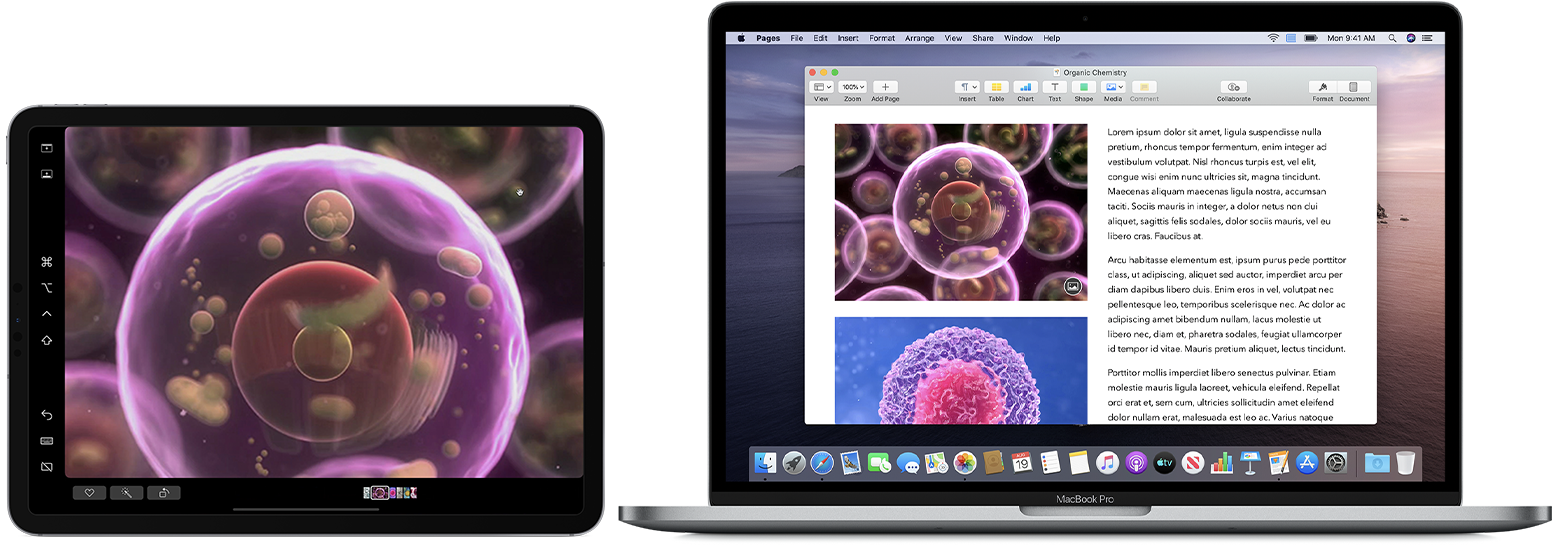
Use your iPad as a second display for your Mac with Sidecar

With Sidecar, you can use your iPad as a display that extends or mirrors your Mac desktop.

iPad next to Macbook using Sidecar

Extend or mirror your Mac desktop with Sidecar

  1. Make sure that your Mac and iPad meet the Sidecar system requirements.
  2. You can use Sidecar wirelessly, but to keep your iPad charged during use, connect it directly to your Mac with the USB charge cable that came with your iPad.
  3. Click the AirPlay icon  in the menu bar on your Mac, then choose the option to connect to your iPad. Or use Sidecar preferences to connect.
    If you don't see the AirPlay icon, choose Apple menu  > System Preferences, click Displays, then make sure that ”Show mirroring options in the menu bar when available” is selected.
  4. Your iPad should now show an extension of your Mac desktop. You can move windows to it and use it like any other display.
  5. To mirror your Mac display so that both screens show the same content, return to the AirPlay menu, which is a blue rectangle  while using Sidecar. Choose the option to mirror your display. This is a great way to share your Mac screen with others.
  6. To end your Sidecar session, return to the AirPlay menu and choose the option to disconnect. Or click the Disconnect button in the sidebar on your iPad.
Learn more about using external displays. For example, you can use Displays preferences to arrange displays so that your iPad extends the left, right, top, or bottom of your desktop.

SlickDeals.net